💡 Quick Take: Royalty-free sites like Pexels offer stunning, high-resolution photography, but their massive PNG file sizes (often 5MB to 15MB+) can ruin your website's performance. With Refinedocs' free, browser-based Image Compressor, you can instantly shrink them into highly optimized, web-ready JPEGs with absolutely zero visible quality loss.
If you're building websites, writing blogs, or designing landing pages, high-quality images are your secret weapon. Platforms like Pexels are an absolute goldmine for free, royalty-free photography.
But there is a catch.
To give you maximum editing flexibility, Pexels offers images in their raw, highest-resolution formats—often resulting in massive PNGs or huge, unoptimized JPEGs. If you upload these files directly to your website, you are setting yourself up for a slow-loading site, frustrated users, and a major penalty from Google's search algorithms.
In this guide, we will show you how to shrink those massive image files down by 80% or more, convert them to web-ready JPEGs, and maintain perfect visual clarity using Refinedocs' Free Image Compressor.
🔍 The Hidden Cost of Massive Images on the Web
When a user visits your website, their browser has to download every single element of the page. If your homepage contains three beautiful 5MB hero images from Pexels, that is 15 megabytes of data just for the visuals.
Here is why this is a massive problem:
- 📉 Slow Loading Speeds: Mobile users on slower connections (3G/4G) will wait several seconds just for the page to render.
- 🚪 High Bounce Rates: Studies show that 53% of mobile site visits are abandoned if a page takes longer than 3 seconds to load.
- 🎯 SEO Penalties: Google uses Core Web Vitals (specifically LCP - Largest Contentful Paint) as a ranking signal. Large images are the #1 reason for poor LCP scores.
- 💸 Data Costs: You are costing your visitors precious mobile data, and potentially increasing your own server hosting bandwidth fees.
💡 Lossy vs. Lossless: The Secret to "0 Visibility Loss"
How can you shrink a file size by 80% without making it look pixelated or blurry?
The answer lies in perceptual quality compression.
High-resolution PNGs are lossless. They store every single color value for every pixel. This is great for printing large posters, but completely unnecessary for computer screens, tablets, or phones.
JPEGs use lossy compression. This format uses mathematical algorithms to discard visual data that the human eye is physically incapable of perceiving (such as tiny variations in color gradients within shadows or sky).
By converting a high-res PNG to JPEG at a high-quality setting (such as 80%), you remove megabytes of invisible data while leaving the visual image completely pristine. To your audience, the before and after look 100% identical.
🛠️ Proof in Action: Shrinking Real Pexels Images by 85%+
To prove how effective this technique is, we put several massive photos through the Refinedocs Image Compressor.
Here are the actual results from our compression run:
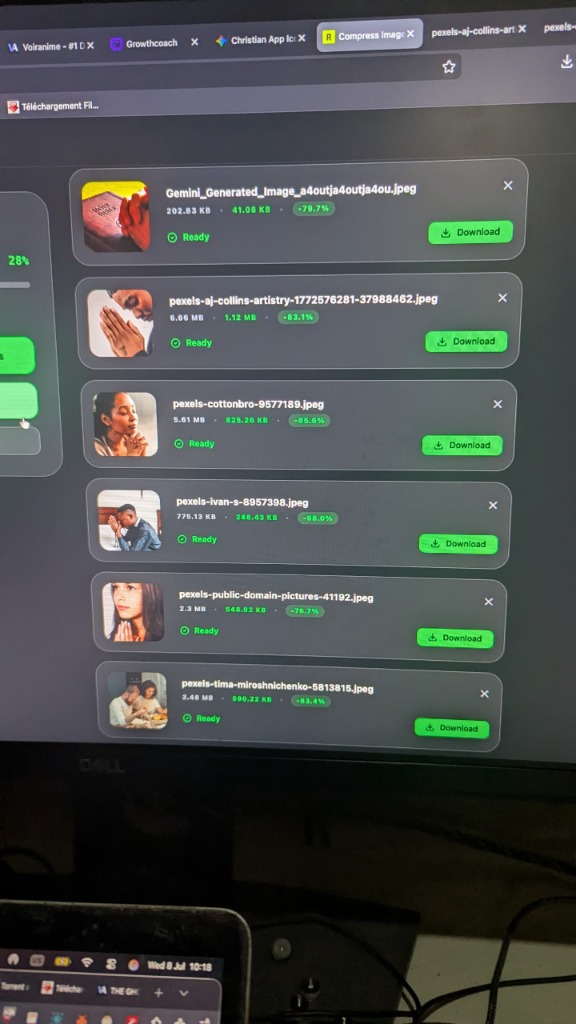
Let's break down the actual file size savings:
- pexels-aj-collins-artistry.jpeg (High-res portrait)
- Original Size:
6.66 MB - Compressed Size:
1.12 MB - Savings: -83.1%
- Original Size:
- pexels-cottonbro-9577189.jpeg (Detailed indoor shot)
- Original Size:
5.61 MB - Compressed Size:
825.26 KB - Savings: -85.8%
- Original Size:
- pexels-tima-miroshnichenko-581315.jpeg (Warm lifestyle group photo)
- Original Size:
3.48 MB - Compressed Size:
590.22 KB - Savings: -83.4%
- Original Size:
- pexels-ivan-s-8957398.jpeg (High-contrast action shot)
- Original Size:
775.13 KB - Compressed Size:
248.43 KB - Savings: -68.0%
- Original Size:
The Verdict:
We reduced a total of over 18 MB of files down to just under 3.3 MB in a matter of seconds. And the best part? Side-by-side, you cannot tell the difference between the original and compressed versions.
✨ Why Refinedocs is the Ultimate Image Compression Tool
Unlike other online image compressors, Refinedocs is built with a privacy-first, developer-friendly architecture:
- 🔒 100% Private (Local Processing): Your images are never uploaded to our servers. All compression happens locally inside your browser's execution engine using secure canvas technology. Your private photos stay private.
- 🚀 Instant Conversions: Because there is no upload or download delay over the cloud, files are processed instantly.
- 🎛️ Custom Quality Control: You can adjust the quality slider in real time to match your exact size/quality constraints.
- 📦 Batch Operations: Compress up to 10 massive images at the same time and download them individually or as a single, organized ZIP file.
- 🆓 100% Free: No subscriptions, no hidden watermarks, and no sign-up required.
📝 Step-by-Step: How to Shrink Your Pexels Images Now
Ready to optimize your assets? Follow these simple steps:
- Go to the Tool: Open the Refinedocs Image Compressor.
- Upload Your Images: Drag and drop your massive PNGs or JPEGs into the upload zone, or click to select them from your device.
- Set the Quality: We recommend 80% as the sweet spot for web images. It yields maximum size reduction with zero visible degradation.
- Hit Compress: The tool will process your images in milliseconds.
- Download: Click the green Download button on individual files, or click Download All to download them as a convenient ZIP archive.
🚀 Pro Tips for Next-Level Web Performance
To get the absolute best PageSpeed scores, combine image compression with these web practices:
🔹 Serve Responsive Images: Don't load a 4000px wide image if it will only occupy a 400px wide container. Resize the image width using the Refinedocs Image Resizer before compressing.
🔹 Implement Lazy Loading: Add loading="lazy" to your image HTML tags so they only download when the user scrolls near them.
🔹 Use Modern Formats: While JPEG is highly compatible, you can also convert to WebP for even better compression on modern web browsers.
🏁 Stop Letting Bloated Files Hold You Back
Don't compromise on website speed or image quality. Start optimizing your royalty-free photos today and watch your site's performance soar.
✨ Compress your images now: refinedocs.com/en/tools/compress-images
✨ Explore the suite: Check out our other tools like HEIC to PNG Converter and AI Background Remover.
Keep your site fast, keep your images sharp, and keep your users happy!
The Refinedocs Team 💙